Capture the whole page from top to bottom.
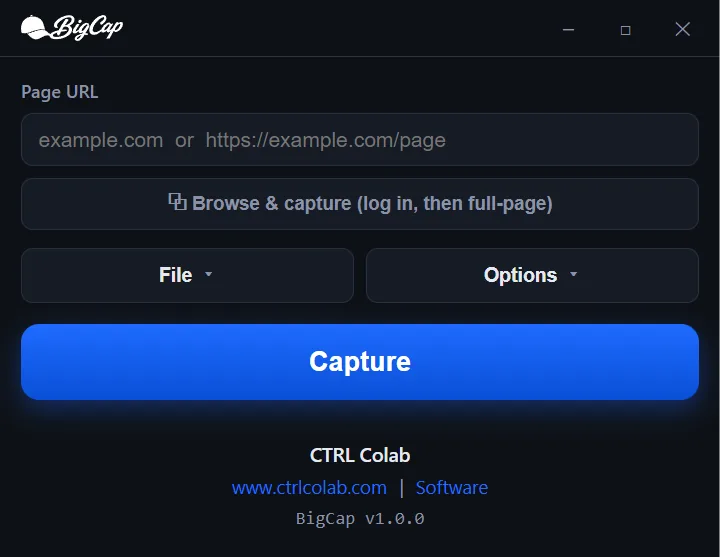
Capture the entire scrolling page with lazy images, web fonts, animations and all and save it as PNG, JPEG, or PDF. Local, private, Windows and macOS.

Built for hard pages
The things that break ordinary screenshot tools are the things BigCap was built for.
Capture pages behind a login
Open the built-in browser, sign in, dismiss what you need to, and hit capture. Your session persists between uses, so next time the page is one click away.
- Sign in once! Cookies and sessions stick, locally
- Set the page up exactly how you want it captured
- Then capture it full-height, same as any other page
Your format, your size
- Lossless PNG, compressed JPEG with a quality slider, or PDF with selectable text.
- Width presets: Mobile 430 · Tablet 1024 · Desktop 1920 · Large 2560.
- 1× or 2× retina scale, and optional splitting into evenly-sized segments.
Your output, dialed in
Every knob you need, none you don't. Straight from the app.
Formats & sizing
PNG, JPEG, or PDF. Width presets; Mobile 430, Tablet 1024, Desktop 1920, Large 2560 — with 1× or 2× scale, a max length cap, and splitting into evenly-sized segments.
Control the capture
Add a delay, hide ads and cookie banners, block trackers at the network level, reveal on-scroll content, neutralize sticky headers, freeze animations. Check, capture, done.
Runs on your machine. No account, no cloud, no tracking.
BigCap sends us its licence check — a serial and an anonymous machine identifier, at activation and roughly monthly — and nothing else. No telemetry, no analytics. Your captures and the URLs you visit never leave your device.
Read the full Privacy Policy →